Invoice Lookup
Query Smarter, Reconcile Faster — Your Invoices at a Glance.
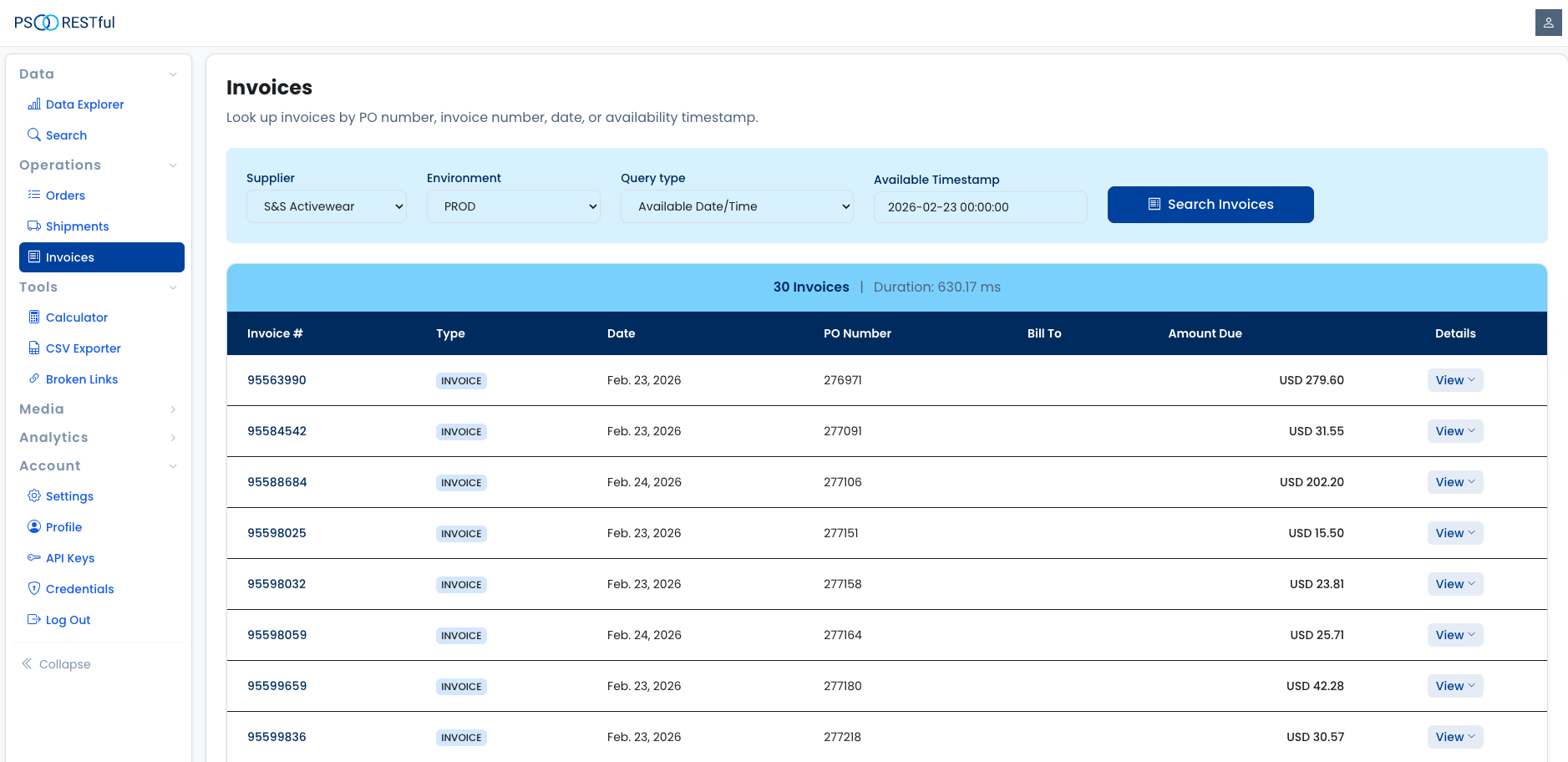
The Invoice Lookup gives distributors a fast, centralized way to retrieve and review supplier invoices. Instead of logging into multiple supplier portals or waiting for emailed documents, you can search by PO number, invoice number, date, or availability timestamp — all from a single interface.
Key Features
- Query by Types:
Users can retrieve invoices by selecting one of the following query types:
- PO_NUMBER: Search by Purchase Order number.
- INVOICE_NUMBER: Search by Invoice number.
- DATE: Search by Invoice Date.
- AVAILABLE_DATE_TIME: Search by availability timestamp to find invoices available since a given date and time.
- Detailed Financial Breakdown: Each invoice can be expanded to reveal a full financial summary, tax breakdown, line items, payment information, and related addresses — all in one place.
How to Use
- Select a Supplier: Choose the supplier you want to query from the dropdown. Only suppliers that support the Invoice service are listed.
- Choose an Environment: Select Production or Staging depending on which environment you want to query.
- Select a Query Type:
Pick one of the four query types. The form fields update automatically based on your selection:
- For PO_NUMBER, enter the Purchase Order number.
- For INVOICE_NUMBER, enter the Invoice number.
- For DATE, specify the invoice date in
YYYY-MM-DD HH:MM:SSformat. - For AVAILABLE_DATE_TIME, specify the availability timestamp in
YYYY-MM-DD HH:MM:SSformat. Pre-filled options from today to the last 7 days are provided for convenience.
- Submit the Query: Click the Submit button to retrieve the matching invoices.
Understanding the Results
The results table includes the following columns:
- Invoice #: The unique invoice number.
- Type: The invoice type (e.g., Invoice or Credit Memo).
- Date: The date the invoice was issued.
- PO Number: The associated Purchase Order number.
- Bill To: The billing account name and location.
- Amount Due: The outstanding balance on the invoice.
Expandable Details
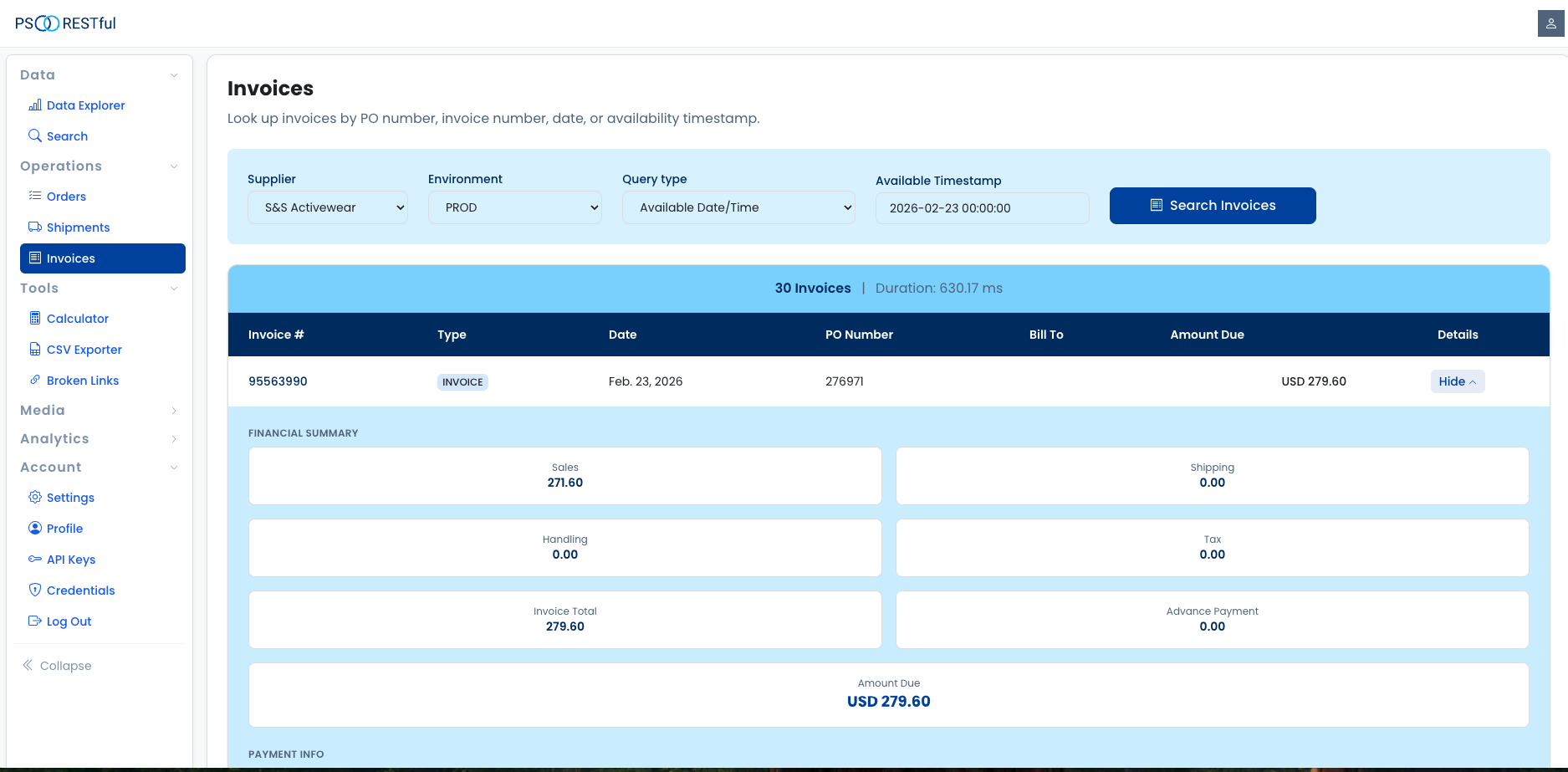
Click any row to expand it and view the full invoice details. The expanded view includes:
- Financial Summary: Sales amount, shipping, handling, tax, invoice total, advance payment, and amount due.
- Payment Info: Payment terms and due date.
- Addresses: Bill-To and Sold-To addresses with contact details.
- Sales Order Numbers: Associated sales order references.
- Tax Breakdown: Itemized taxes by type, jurisdiction, and amount.
- Line Items: Product ID, description, quantity, unit price, and extended price for each line.
- Comments: Any comments attached to the invoice.
- Document & Payment Links: Direct links to view the invoice document or make a payment, when available.
Start Using the Invoice Lookup Today!
Streamline your invoice management and speed up reconciliation with our Invoice Lookup.
Start Now